ENIGMA • CUSTOM
Auto-Hunt & Adventures
The client has its own auto-hunt. Pick a hunt in the Adventures window and press Start hunting.
Start a hunt
Press I (or the robot button on the screen) to open Adventures.
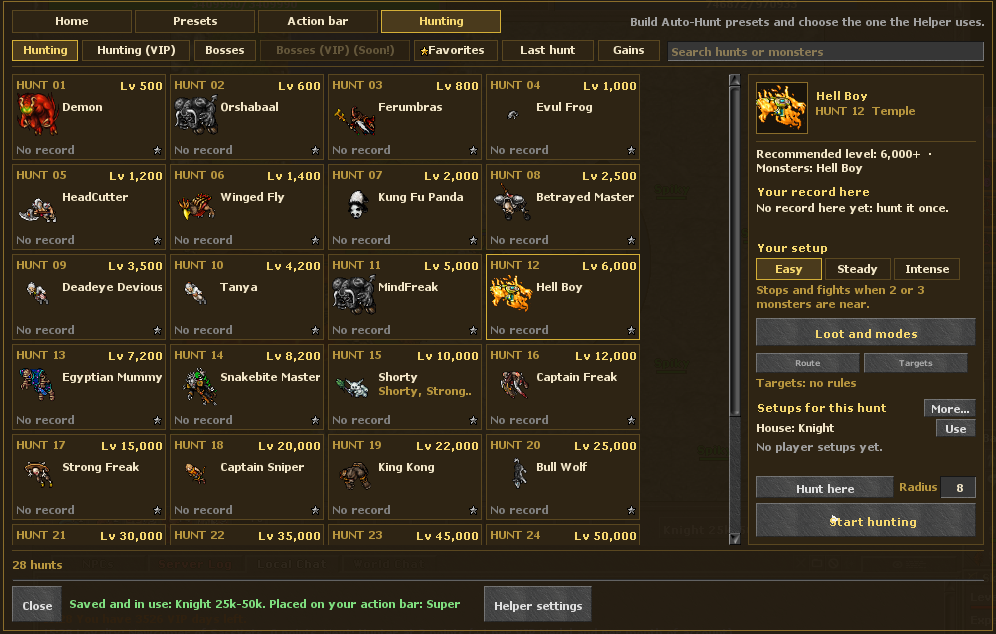
- Pick a hunt. Each card shows its level; the star saves a favorite.
- Choose the mode: Easy pulls up to 2 monsters, Steady up to 4, Intense up to 8.
- Route shows the path of the hunt. Targets lets you choose which monsters to attack.
- Press Start hunting. The character travels to the hunt and starts. The same button turns into Stop.
- Hunt here: hunts around the tile you are standing on, inside the chosen radius.
- Gains: experience, gold and kills per hour, plus your best record in each hunt.
Follow and stop
The Home tab of the builder shows what the bot is doing right now.
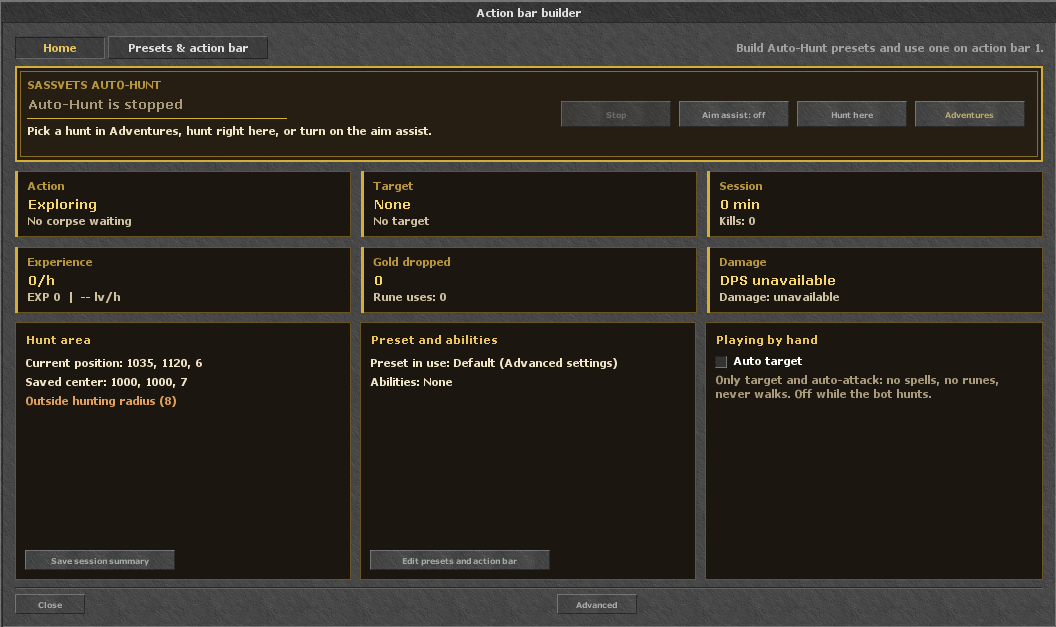
- Stop ends the hunt. The robot button on the screen also stops it.
- Aim assist (Alt+A): you walk, and it casts your preset's attacks on the target.
- Adventures opens the hunt catalog.
- Live session: action, target, time, experience per hour, gold and damage.
- Auto target: only picks the nearest monster and attacks. No spells, no runes, never walks.
Build your preset
A preset is what the bot uses: spells, runes, loot and care. Open the Presets tab.
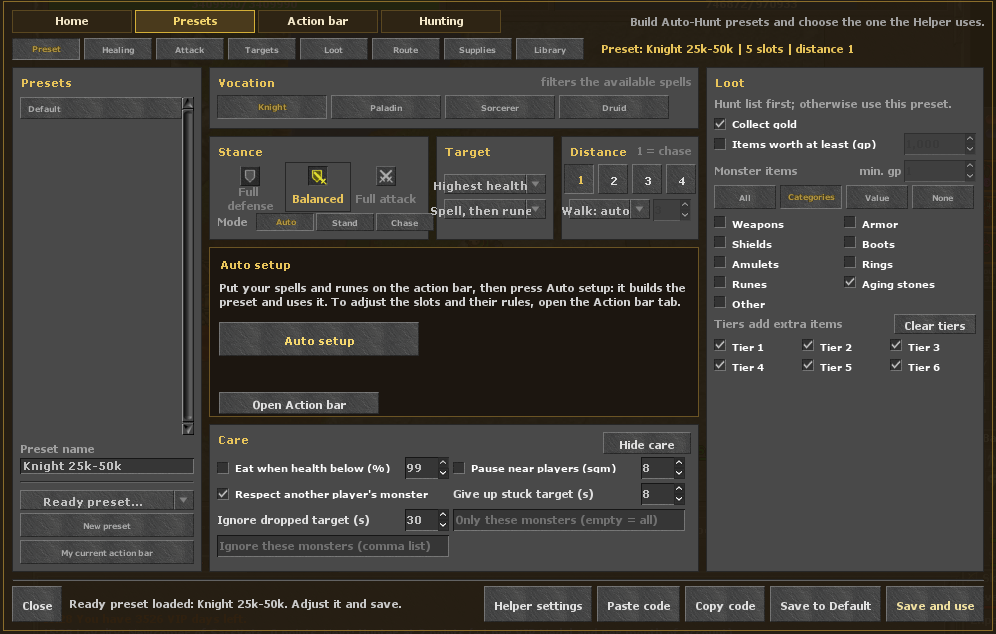
- Ready preset: a preset ready for your vocation and level. Load it, adjust it and save.
- Vocation: shows only the spells of that vocation.
- Distance from the monster (1 = chase) and what to do when a monster shows up on the way.
- Auto setup: put your spells and runes on the action bar, press it and the preset is built and used.
- Open Action bar: adjust the slots and their rules.
- Loot: gold, item types and tier drops to collect.
- Care: eat, pause near players, respect another player's monster, give up on a stuck target.
- Save and use: saves the preset and puts its spells and runes on empty buttons of your action bar. Nothing there is moved or removed.
When a monster shows up on the way: Auto follows the hunt mode, Follow chases it, Clear, go back fights and returns to the route, Stop with N only stops with N or more monsters, Ignore keeps walking.
In the Action bar tab, the bot uses the slots in order.
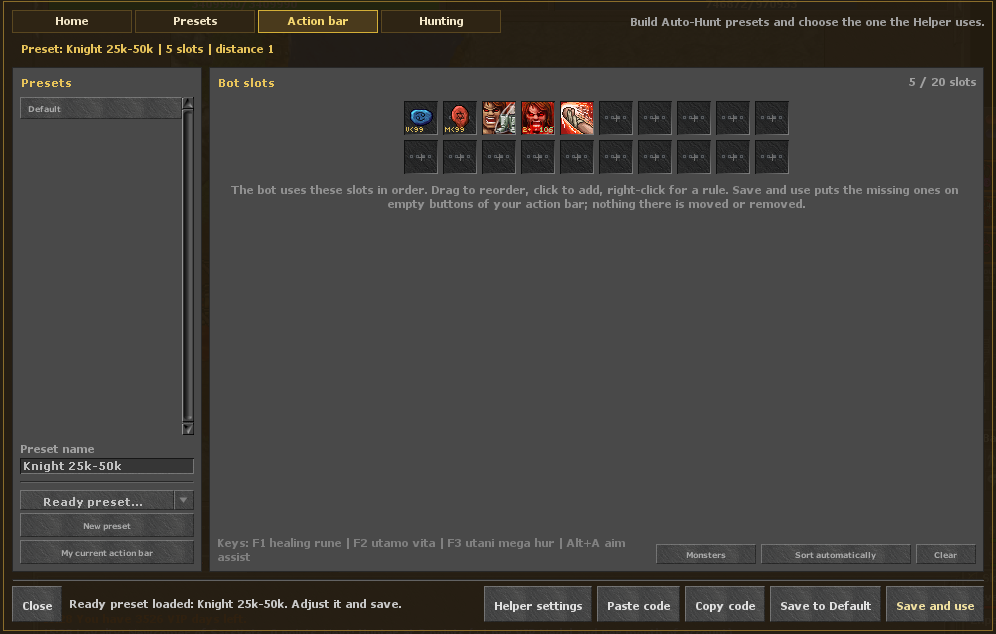
- Bot slots: drag to reorder, click to add a spell or rune, right-click to set a rule (health, mana, number of monsters).
- Monsters: the list of targets and their rules.
Good to know
- Leave combat before starting the auto-hunt.
- Keys that work with or without the bot: F1 healing rune, F2 utamo vita, F3 utani mega hur, Alt+A aim assist. You can change them in Options > Keybinds.
- Aim assist only works with the hunt stopped and does not open corpses: open them yourself.
- If the character gets stuck, the bot asks for a rescue teleport (up to 3 times per hunt). It does not work in events, the arena or CTF.
- With a full backpack, looting stops but the hunt goes on. If you die, the hunt stops.
- With VIP auto loot, items that do not fit in the main backpack go to the first bag inside it that has room.
- Hunt here has no route and no rescue teleport: it only hunts around where you stand.
- VIP hunts need an active VIP. The Bosses (VIP) tab is coming soon.